The platform
Enterprise Architecture as Code, explained.
Enterprise Architecture as Code (AaC) is the practice of defining business capabilities, applications, data flows, infrastructure, and security controls in plain-text domain-specific files stored in Git, using a compiler and CI/CD pipelines to validate architectural rules and automatically generate stakeholder views and governance artifacts.
Scapius replaces disconnected diagrams and survey-driven portals with readable `.ea` files in your repository. Architecture specialists maintain the model. Scapius validates it and compiles 13 view projections that business leaders use in planning, portfolio reviews, and risk decisions.
One maintained model. 13 compiled projections.
Instead of manually drawing connector lines across multiple tools, your architecture team captures capabilities, systems, data, and security controls once. The compiler checks relationship rules and recalculates diagrams whenever the code updates.
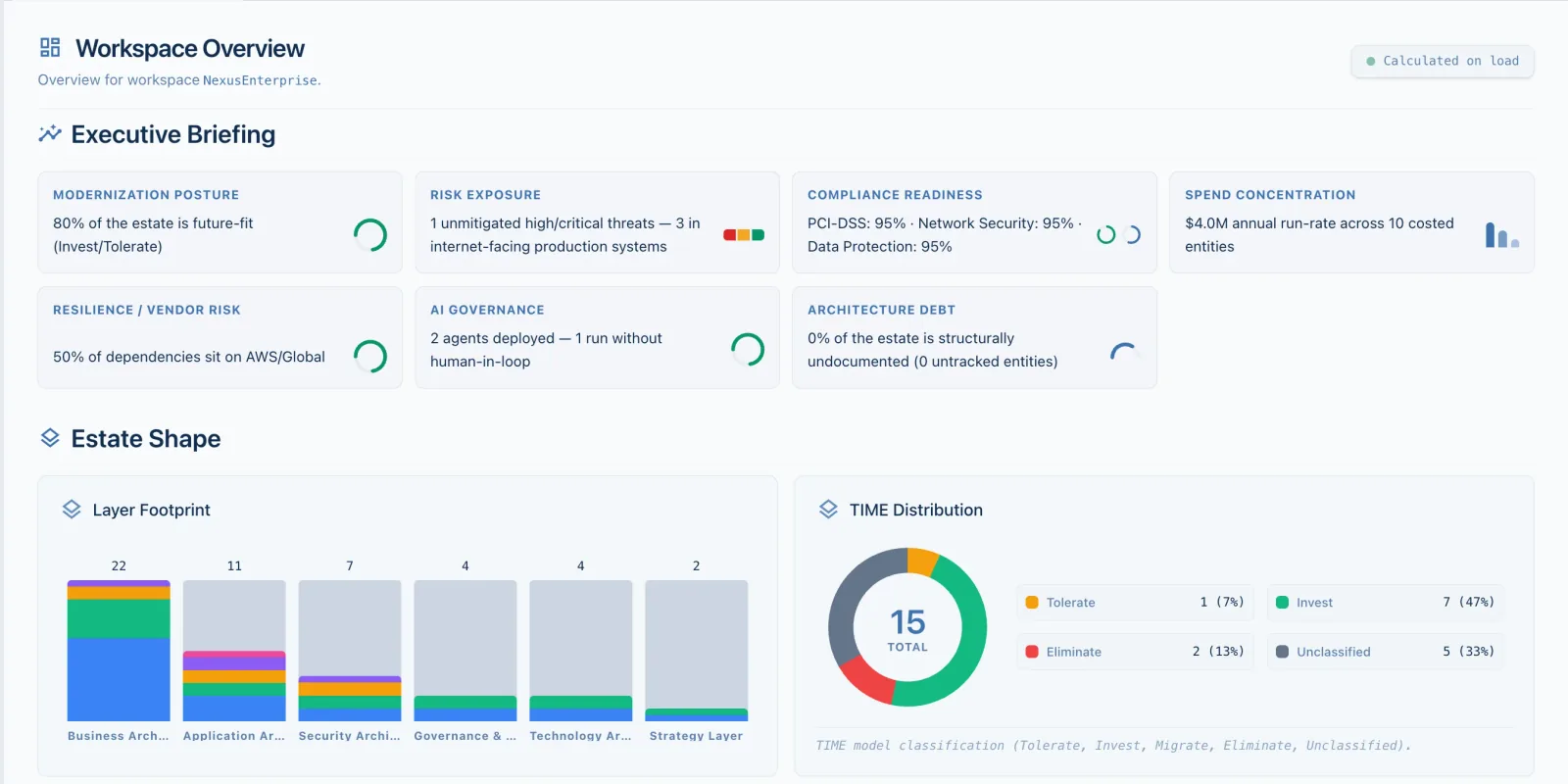
The Scapius Built-in Workspace Dashboard compiling portfolio health, spend, and risk.
The three stages of Architecture as Code
Describe the architecture
Write business capabilities, applications, data objects, and security controls in plain-text .ea files stored in your team's Git repository.
Compile and validate
The compiler validates cross-file references and relationship rules at authoring time and in CI/CD, catching architecture drift before code merges.
Generate views for decisions
Compile focused views and the executive dashboard to discuss strategy, spend, cloud migration, data privacy, and risk with stakeholders.
Choose your perspective
How stakeholders consume architecture views
Non-technical stakeholders never need to install Git, open a code editor, or write `.ea` files. Architects maintain the repository and publish compiled evidence through your edition's delivery model.
Community edition (Beta)
Available todayDesigned for individual architects and domain evaluation on a single local workspace.
- Architects author `.ea` files locally and explore the interactive web viewer on localhost.
- Export point-in-time SVG and PNG views for architecture review boards, slide decks, and Confluence or Notion pages.
- Run the CLI compiler in GitHub Actions, GitLab CI, or Azure DevOps to attach compiled SVG artifacts to pull requests.
Enterprise BYOC & Cloud
Coming soonPlanned shared web portal for multi-team organizations, executives, and risk officers.
- Browser-based, read-only executive portal synchronized with your central Git repositories.
- OIDC single sign-on, SCIM directory sync, and role-based access control (Viewer, Editor, Admin).
- Multi-workspace federation, immutable audit logs, and REST/GraphQL read APIs for governance reporting.
Run a 30-minute architecture pilot on one business domain
You do not need a six-month inventory rollout to evaluate Scapius. Test the compiler and view projections on a single high-priority initiative in four focused steps.
1. Launch Community locally
Start the local Scapius Community container or binary and open the sample retail banking workspace in your browser and VS Code.
2. Model 5 core applications
Define one business capability, five applications, their annual run spend, Gartner TIME classification, and two upstream/downstream data flows.
3. Compile 4 stakeholder views
Declare a capability map, a system landscape, a sensitive data flow view, and a STRIDE threat model, then inspect the Built-in Workspace Dashboard.
4. Verify CI & export SVG
Introduce an intentional broken reference to see the compiler diagnostic, fix it, and export crisp SVG diagrams for your next architecture review.
Architectural comparisons
How Scapius compares with other approaches
vs. Cloud EA Portals
How Scapius compares with SAP LeanIX and Ardoq.
vs. Traditional EA Suites
How Architecture as Code compares with BiZZdesign and Sparx.
vs. Diagramming Tools
How compiled models prevent diagram drift compared with Visio, Lucidchart, PlantUML, and Mermaid.
Business solutions to explore
Start directly from the decision in front of you.